Fix Microsoft Office Word Has Not Been Installed For The Current User Error
“Microsoft Office Word has not been installed for the current user. Please run setup to install the application.”
Bản cập nhật mới đây của Microsoft đã khiến nhiều người sử dụng gặp phải lỗi thông báo rằng “Microsoft Office Word has not been installed for the current user. Please run setup to install the application.” (“Microsoft Office Word chưa từng được cài đặt cho người dùng hiện tại. Hãy chạy setup để cài đặt ứng dụng"). Sau khi ấn nút OK, Microsoft Word sẽ đóng lại. Bạn cũng gặp phải lỗi tương tự nếu chạy bất kỳ ứng dụng nào trong Office như Excel, PowerPoint, OneNote, Publisher, Access, Outlook,...Vấn đề rắc rối ở chỗ: dù bạn có gỡ bỏ rồi cài đặt lại Microsoft Office thì cũng không thể sửa được lỗi này.
Nếu bạn tìm kiếm trên Microsoft KnowledgeBase, bạn sẽ thấy có một giải pháp là phân quyền quản trị đầy đủ của file Opa11.dat cho tất cả mọi người. Tuy vậy, giải pháp này chỉ có thể giúp sửa lỗi khi người sử dụng không có tài khoản quản trị không có quyền thay đổi các file nhất định được sử dụng trong chương trình cài đặt Office2003/XP.
Một nguyên nhân nữa gây ra lỗi này là do bạn sử dụng phiên bản lậu của Microsoft Office rồi sau đó lại cập nhật các update mới nhất. Một số người có thể sửa lỗi này bằng cách sử dụng System Restore, nhưng dưới đây là cách đơn giản hơn để sửa lỗi này.
File gây ra lỗi này là MSO.DLL nằm ở C:\Program Files\Common Files\Microsoft Shared\OFFICE11 (đối với Office 2003) hoặc C:\Program Files\Common Files\Microsoft Shared\OFFICE12 (đối với Office 2007). Thông qua Windows Updates, Microsoft đã cập nhật file này khiến bạn gặp phải lỗi trên nếu như bản cập nhật phát hiện ra rằng Microsoft Office của bạn là bản lậu. Khi bạn thử chạy file cài đặt để sửa lỗi, hay thậm chí là cài lại thì bản cài đặt cũng không hề động tới file MSO.DLL, và như vậy, việc sửa lỗi hay cài lại sẽ chẳng có tác dụng gì.
Giải pháp đơn giản cho vấn đề này là bạn tìm file MSO.DLL trong hệ thống hiện tại, rồi copy đè file MSO.DLL cũ thay thế file mới. Có hai phiên bản của file MSO.DLL nằm tại C:\WINDOWS\Installer\$PatchCache$\Managed\…..
Nếu bạn không thể tìm thấy file MSO.DLL sao lưu trong máy, bạn chỉ cần xóa file MSO.DLL hiện tại trong Program Files và sau đó chạy lại file cài đặt để sửa lỗi hoặc cài lại Microsoft Office 2003/2007 là được. Việc cài lại như vậy sẽ khôi phục lại phiên bản cũ của file MSO.DLL từ bộ cài (trên máy hoặc trên đĩa CD/DVD).
Ăn cắp bản quyền là tình trạng phổ biến hiện nay, điều đó thật tệ. Nhưng tôi thấy ngạc nhiên rằng Microsoft lại dạy cho người tiêu dùng một bài học về nạn ăn cắp bản quyền bằng việc tạo ra một lỗi vớ vẩn mà chẳng có thông báo nào chỉ đích danh đến vấn đề mà người dùng đang gặp phải, thạm chí với rất nhiều người còn không biết rằng chính họ đang là nạn nhân của nạn ăn cắp bản quyền, vì họ mua máy tính được cài đặt sẵn phần mềm lậu từ các cửa hàng vi phạm. Nếu bạn gặp phải lỗi tương tự và đang đọc bài viết này, thì có lẽ bạn cũng là người đang vi phạm bản quyền, hoặc là nạn nhân của tệ nạn này đấy.
Nguyễn Hoàng Long
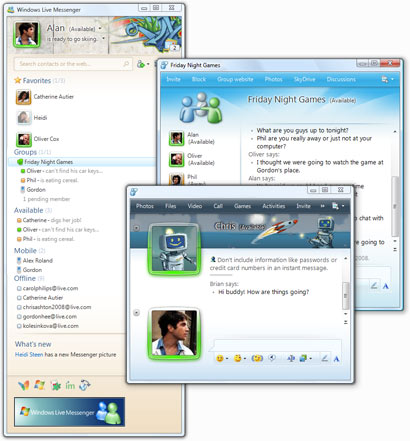
Software Windows | Rapidshare | Windows Live™ Messenger | 133 MB
System:
- Processor: 1 GHz or higher for Windows Vista; 800 MHz or higher for Windows XP
- Memory: 128 MB of RAM (256 MB or more recommended) for Windows XP; 512 MB for Windows Vista
- Resolution: Minimum 1024 x 768
- Internet connection: Internet functionality requires dial-up or broadband Internet access (provided separately). Local or long-distance charges may apply.
Programs you can download include:
- Messenger
- Mail
- Writer
- Photo Gallery
- Movie Maker beta
- Family Safety
- Toolbar
- Get Messenger and stay in touch: Windows Live Messenger makes it easier than ever to stay connected to the people you care about.
- Favorites and groups: Put the people you chat with most at the top of your contacts, so you easily see when they’re online. Want to chat with several people in one window? Just set up a group.
- Customize: Show off your personal style with custom scenes, animated display pictures, and signature sounds.
- Share photos: Look at photos together, right in the conversation window. And Messenger tells you when people you know post new photos on Windows Live.Mobile and web
- Using a public computer without Messenger? No problem! You can chat on the web from Windows Live Hotmail. Or, use Messenger on your mobile phone.
Windows Live products require the following:
- Operating system: Windows XP with Service Pack 2 (32-bit edition only), Windows Vista (32-bit or 64-bit editions), Windows 7 Beta (32-bit or 64-bit editions), or Windows Server 2008.
Note: Windows Live Movie Maker is not supported on Windows XP
- Browser: Windows Live Toolbar requires Microsoft Internet Explorer 6 or later
- Graphics or video card: Windows Live Movie Maker requires ATI Radeon 9500 (or higher) or nVidia GeForce FX 5900 (or higher).
Windows Live™ Messenger Official Site: http://www.msn.com
Download:
http://rapidshare.com/files/265412679/wlsetup-all_ONE.SOFTARCHIVE.NET.rar.001 http://rapidshare.com/files/265422421/wlsetup-all_ONE.SOFTARCHIVE.NET.rar.002
Use File Splitter & joiner To Join Them
http://rapidshare.com/files/205559808/FileSJ_by_militant_one.softarchive.net.rar
Internet Download Manager 5.18 | 3.73 MB
Phần mềm tăng tốc download mạnh nhất hiện nay đã ra mắt phiên bản thử nghiệm 5.18 beta (10/08/2009), với các tính năng cải tiến như:
- Xử lý tên miền với ngôn ngữ khác ngoài tiếng Anh.
- Hỗ trợ bảng mã Unicode cho phần mô tả đặc điểm file (descriptions) và tên file.
- Cập nhật biểu tượng IDM.
- Nâng cấp khả năng nhận dạng lỗi server.
Trang chủ: http://internetdownloadmanager.com/news.html
Download:
Megaupload: http://www.megaupload.com/?d=04EJCHLF
Easy-share: http://www.easy-share.com/1907280503/id518_sobisvn.softarchive.net.rar